Global Options enables administrators to set distinct options at a global level. The Global Options sub-page contains key properties that guide Journal Entry Manager administration and are used for the initial setup and configuration of Journal Entry Manager. Global Options is the default sub-page for administrators. Journals is the default sub-page for non-administrators.
NOTE: All global option settings are retained during solution upgrades.
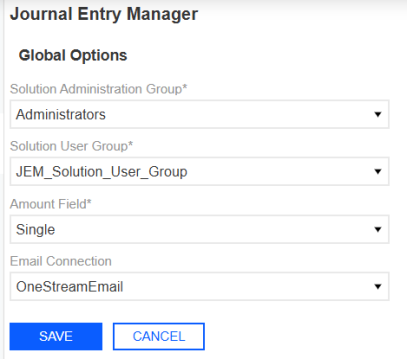
Solution Administration Group
The Solution Administration Group is governed at the global level. Administrators can select a Platform Security user group to assign as the Solution Administration Group, which will serve as Journal Entry Manager administrators. Users in this group have access to Journals, Templates, ERPs, Audit Log, and Settings pages of Journal Entry Manager.
Solution User Group
Administrators must assign the Solution User Group, which is a Platform Security group that contains all users that need access to Journal Entry Manager. Users assigned at this group level can perform journal workflow actions.
Amount Field
Administrators can select an Amount Type to configure how end users input the amount in journal entries by selecting the Amount Type. The options are Single and Dual:
-
Single: Only one amount field is displayed in the Journal slide-out panel.
-
Dual: Separate debit and credit columns are displayed in the Journal slide-out panel.
IMPORTANT: This does not impact how the journal is extracted and is solely a UI function.
Email Connection
Administrators can specify the email address linked to Journal Entry Manager, enabling notifications to be sent to the designated connection.
Assign Global Options
-
Go to Settings > Global Options.
-
From the Solution Administration Group drop-down menu, select a user group.
-
From the Solution User Group drop-down menu, select a user group.
-
From the Amount Field drop-down menu, select either Single or Dual.
-
In the Email Connection field, enter an email connection to use for notifications sent from Journal Entry Manager.
-
Click the Save button.


